For the longest time I have been searching and testing probably dozens of apps for a very specific purpose. A simple app to temporarily store text and images, which mostly are screenshots. I could not find a perfect one, so I finally built it myself.
Why?
The use case for such app is simple: I am doing some debugging and need to write short notes, save copied log messages, code snippets, IP addresses and whatnot. I also take screenshots, and want to store them next to the text. These snippets do not serve any purpose after the problem has been solved or the task is done, so they do not belong to my PKM (Personal Knowledge Management) or team’s knowledge management system. Perhaps a proper guide will be written, that that is a different story. The ability to copy text and images to other apps of course helps in this.
In every app I have tested over the years there has been something, that made them all feel not quite right. Closest to my need was Microsoft’s OneNote, but that is such resource hog and total overkill for my use case, that I finally gave in and built a perfect app for myself.
What I built?
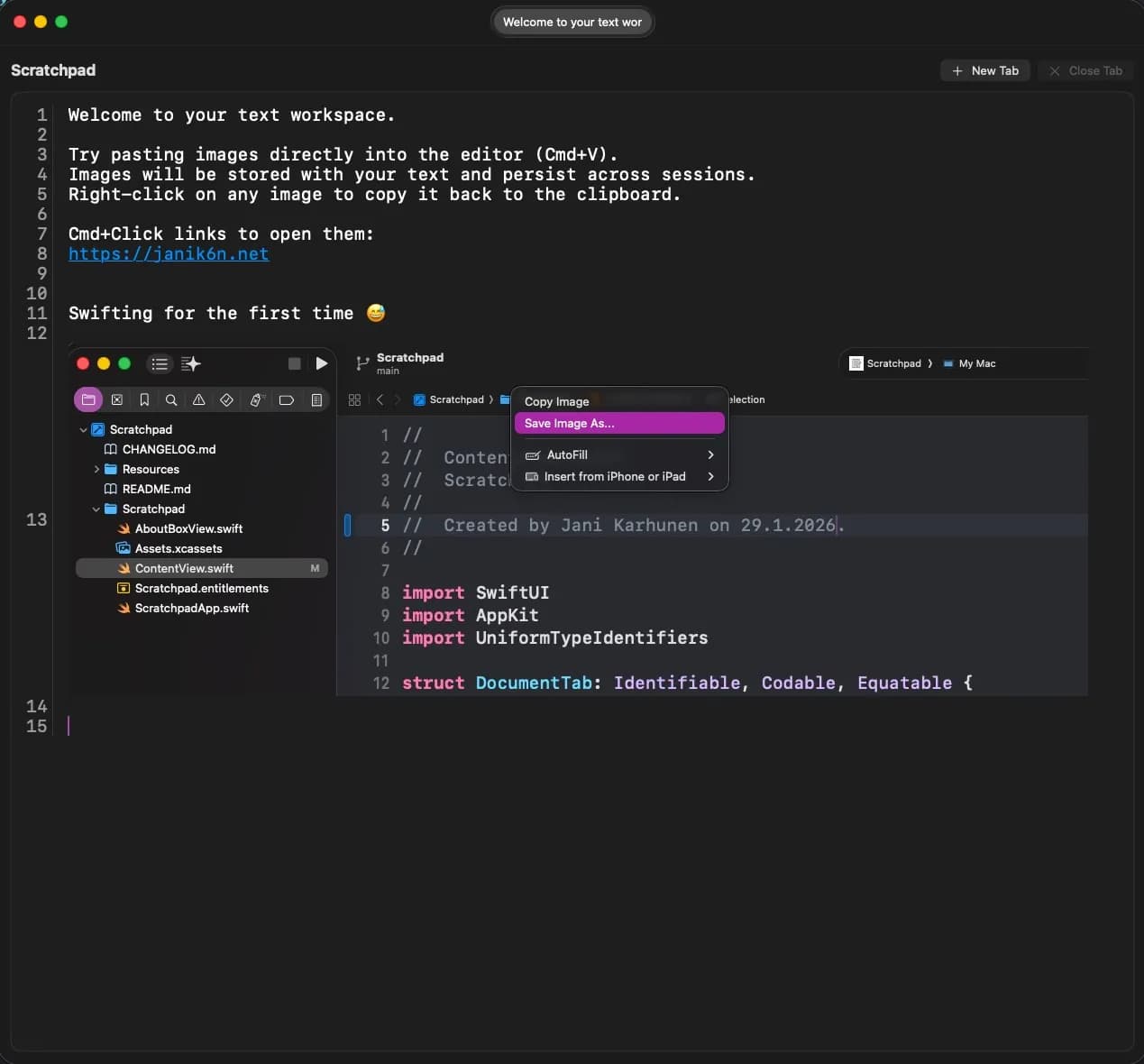
Scratchpad is a minimal temporary place for text and screenshots on macOS. It has just the features I need, and nothing more:
📝 For text:
- Paste any text to the app with
Cmd + [v] - All color and formatting will be removed automatically, only characters and whitespace is preserved.
- Copy text to other places with
Cmd + [c] - Links are highlighed and they can be opened in default browser with
Cmd + mouse click.
🖼️ For images:
- Paste a screenshot or other image to the app with
Cmd + [v] - Use right mouse button context menu to copy the image back to clipboard or save it as file to disk.
🖥️ UI:
- Increase font size with
Cmd + [+] - Decrease font size with
Cmd + [-] - Create up to three tabs
📦 Data storage and persistence:
- Data is stored only locally within app sandbox. Location can be opened through About dialog.
- Data is saved automatically every 5 seconds, and before app is closed.
So macOS standard keyboard shortcuts are used and respected.
How I built this?
I have never written a single line of Swift code before, or built a native macOS app. Once upon a time I used to build and sell iPad apps for the first generation iPad so I know something about building apps on Apple ecosystem, but in this case and after such long time the most useful thing was some kind of familiarity with Xcode. Although an ancient version of it…
My daily driver as far as development environments go, is Visual Studio Code and I have been using GitHub Copilot as my AI development buddy almost since its public launch. I launched Xcode and started looking if there was some way to utilize GitHub Copilot within Xcode environment. And there actually is an official “sidecar” app, which is currently in public beta, github/CopilotForXcode: AI coding assistant for Xcode. I initially installed the latest release 0.46.0 but soon found out that calls using my trusty Claude Sonnet 4.5 failed with some client errors. After digging the GitHub issues, I installed a pre-release version 0.46.159 which resolved issues with Claude and I was good to go!
Since I absolutely did not have an idea how to write a modern macOS app, or write Swift for that matter, I defaulted to agentic coding. With initial planning session with the agent about my requirements for functionality, security, good practices and limitations what the app should not include, I let the agent to work. For some reason (could it possibly be because of beta 😳) with Claude Code 4.5 the agent was quite often unable to edit the code properly, and made a complete mess of the codebase. Number one tip in software development: use version control, and commit often. Easy to reset and start again.
I got quite frustrated with this experience, which led to desperate measures, like trying an OpenAI model for coding. What surprised me on some level was the success with GPT-5.2-Codex. Maybe I should try this model more in other projects too? 🤔
In total I have spent probably between 5 and 6 hours with the development of Scratchpad so far. I consider it to be feature-complete, and as far as I know, it appears to be bug free. Which of course does not mean it is. 🐛
I evaluated the codebase with various AI models and tools to make sure it is safe to run and follows at least good-ish Swift and macOS development practices. 🤗
Actually now that I think of it, could I have built a macOS app with Swift within VS Code, without Xcoce at all? Xcode command-line tools maybe would be enough? 🤔
I created the app icons with App Icon Maker after using ChatGPT to create the initial app icon. Just as a note to myself, the input image for App Icon Maker needed to be a 1024x1024 px PNG image.
I have used AI coding assistants for long time in various projects and with different technologies. This was my first experience building a native macOS app, and I can safely say it will not be the last. AI-assisted and agentic coding finally makes it possible to create all the necessary tools I need, with just the features I want, and nothing more.